---
title: 'Login widget'
url: 'https://documentation.netstorming.net/login-widget'
markdown: 'https://documentation.netstorming.net/login-widget.md'
date: '2026-11-10'
description: 'Login widget Last Update: 23/03/2021 How it works If you want to include the TOWeRS authentication form in your company website or in a third party website, you can do it by including the following HTML snippet
```
where:
- `[ISO2_COUNTRY_CODE]` is the ISO2 country code lie `en, it, fr, de, es` etc
- `[SYSTEM_URL]` must be the url of your TOWeRS website login
- CSS and JS inclusion can be placed near `div#towers_login_wrp` as shown above, or into the `` tag or before `` tag
- the form style can be overwritten with your own style by overriding the CSS selector `div#towers_login_wrp`
### How can you customize it?
The widget load and inject a small vertically stacked form composed by three inputs, one submit and a link styled by a minimun remote CSS and the results, without any client overrides, should be something like this
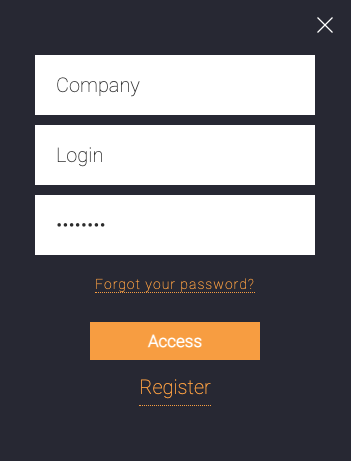
Here the HTML form sample snippet
```
```
That can be styled by a client CSS overriding rules like `#towers_login_wrp #towers_login_form ... { ... }`.
For example, if an horizontal form is required, the UI will be achieved adding CSS rules like:
```
#towers_login_wrp #towers_login_form input {
display: inline-block;
width: 19%;
margin-right: 1%;
}
#towers_login_wrp #towers_login_form .actions {
position: relative;
top: 45px;
display: inline-block;
width: 20%;
}
```
---
## Navigation
- Previous: [TwoWays](https://documentation.netstorming.net/twoways.md)
- Next: [Single Sign On](https://documentation.netstorming.net/single-sign-on.md)