---
title: 'Availability Search Widget'
url: 'https://documentation.netstorming.net/availability-search-widget'
markdown: 'https://documentation.netstorming.net/availability-search-widget.md'
date: '2025-05-06'
description: "Availability search widget Last Update: 16/02/2024 How it works Using this widget, you'll be able to include an availability search form for your TOWeRS B2C system in your company website or in any third party website. First thing, you should make sure to include jQuery and jQueryUI (complete with …"
---
# Availability Search Widget
[](#) Availability Search Widget
## Availability search widget
###### Last Update: 16/02/2024
### How it works
Using this widget, you'll be able to include an **availability search form for your TOWeRS B2C system** in your company website or in any third party website.
First thing, you should make sure to include jQuery and jQueryUI (complete with its i18n component), as it relies on them to work properly. Here is an example using jQuery and Google CDNs:
```
```
Then you can add the following HTML snippet:
```
```
where:
- `[SYSTEM_URL]` must be the url of your TOWeRS B2C website
- CSS and JS inclusion can be placed near `div#hc_ext_form_wl` as shown above, or into the `` tag or before the `` tag
### How can you customize it?
It is possible to select the language used for the form labels, choosing among one of those configured for your TOWeRS B2C website:
```
```
Some properties of the widget can be customized using the following CSS variables (in the `:root` context):
`--nw-border-radius`: *border corner's radius*
`--nw-font-family`: *labels font*
`--nw-font-size`: *font's base size*
`--nw-font-color`: *font's color*
`--nw-primary-color`: *primary color*
`--nw-secondary-color`: *secondary color*
`--nw-accent-color`: *accent color*
`--nw-wrapper-background`: *widget's background color*
`--nw-wrapper-box-shadow`: *widget's shadow effect*
`--nw-dropdown-box-shadow`: *dropdowns' shadow effect*
`--nw-selected-color`: *border color for currently active element*
`--nw-room-separator-color`: *color of the separator between two consecutive rooms when children have been selected*
`--nw-button-background-color`: *generic buttons color*
`--nw-button-font-color`: *generic buttons' font color*
`--nw-submit-button-background-color`: *submit button color*
`--nw-submit-button-font-color`: *submit button's font color*
`--nw-state-active-background-color`: *background color for the currently active element (all dropdowns)*
`--nw-state-active-color`: *font color for the currently active element (all dropdowns)*
`--nw-datepicker-link-color`: *link color (calendar)*
`--nw-datepicker-current-day-background-color`: *background color for current day element (calendar)*
### Full HTML example
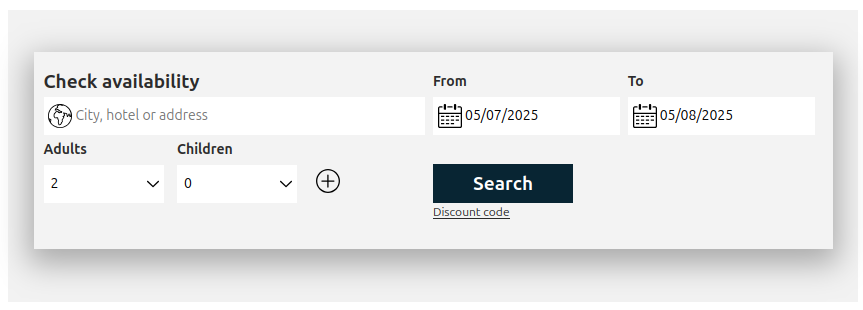
Here is the full HTML code for a minimal web page including the availability search widget with some customizations:
```
Search availability TEST PAGE
NETSTORMING AVAILABILITY SEARCH WIDGET EXAMPLE
```
Which will be rendered similarly to:
---
## Navigation
- Previous: [Single Sign On](https://documentation.netstorming.net/single-sign-on.md)
- Next: [DNS Configuration](https://documentation.netstorming.net/dns-configuration.md)